

Sample exercise in a virtual science field trip activity
Science is typically thought of as compartmentalized and discrete pieces of information and taught in a vacuum. In reality, science is part of day-to-day life and not separate at all. When I see news of science being rejected or painted as a this or that argument in the American educational system, particularly K-12, I become frustrated. Those individuals denouncing science as some form of dogma don’t seem to have an issue driving automobiles, flying across the country, or using mobile phones and computers – all impossible with technology (applied science).
Science is a tool in our toolbox of life that can help us understand the world around us. It allows us to create sunglasses, live and work in greater comfort, and even carry a library of 10,000 songs in our pocket. As such, science is intertwined in our lives and is not simply a set of discrete and separate concepts.
In writing a virtual science field trip workbook, I have science activities and exercises. An example of an activity is a nuclear power plant and within that activity there are supplementary exercises.
Real field trips are like this also and, unlike a text book, field trips can offer an opportunity to explore more than the topic at hand. This virtual nuclear power plant has more learning opportunities than only nuclear fission and those are incorporated into its learning objectives because learning science can be more than studying discrete concepts.
A holistic approach to science education isn’t the current norm is school where we have schedules, curriculum, standards, and the real task of reaching 20-30 (or more) in a very short time period. However, for self-paced education done at home, these constraints are reduced and a student can take additional time to learn more. The exercises I include are part of the virtual 3D location that the student can enter and explore first hand.
In Enclave Harbour, a virtual municipality, there is a nuclear power plant where a nuclear reactor is being constructed and, as part of that, a tower crane is in use. A tower crane is a fantastic way to illustrate simple machines because it is minimalistic in design and utilitarian in function. The concepts of levers and pulleys is easily demonstrated and explored, and this presents a wonderful opportunity to “weave” in some additional science into this field trip activity.
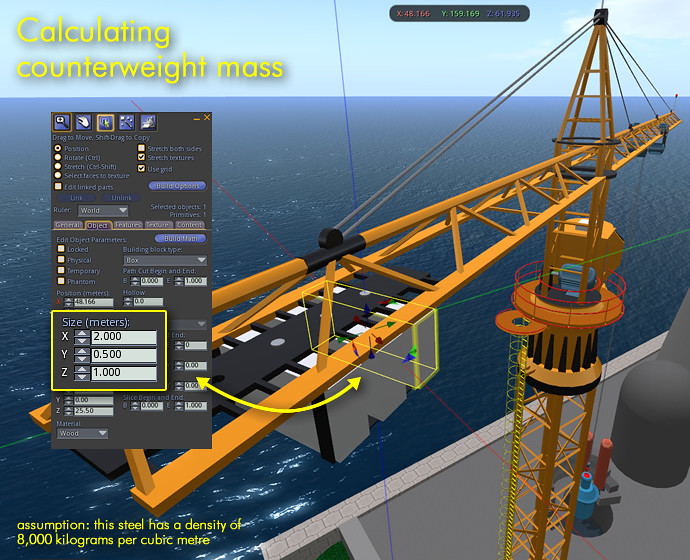
One of the tasks in this “extra” exercise is to calculate the mass of the crane’s counterweights. Other tasks include calculating lift capacities at various distances along the crane’s jib and the mechanical advantage of block and tackle systems. These exercises are intended to bring about an awareness of how science is always around us and that it is not a dogma.
The student is provided with the dimensions of the counterweight, the density of its material, and the formulas needed. In this case, steel counterweights with a density of 8,000 kilograms per cubic meter and overall dimensions of 2 meters long, half a meter wide, and 1 meter tall. Volume (V) is determined by multiplying length (l) times width (w) times height (h). The mass (m) of the counterweight is its volume times the material’s density (ρ, the Greek letter rho).
- V = l · w · h
- m = V · ρ
In this example, we first find the volume of one weight which is 2 m · 0.5 m · 1 m = 1 m3 (one cubic meter) and then calculate its mass with 1 m3 · 8,000 kg/m3 = 8,000 kg.
There are three counterweights on this crane for a total of 24,000 kg or 24 metric tons. This exercise continues with calculating that the crane can lift 12,000 kg at its farthest end and calculating maximum lift at other points along the jib. Also covered is the mechanical advantage through its block and tackle, which is six, meaning that 2,000 kg of force is required along with 6 meters of cable for every meter that the 12,000 kg is lifted.
This physics exercise on simple machines supplements others in Enclave Harbour such as an overhead crane and screw jacks at the desalination plant and pulleys in a vertical-lift bridge.
Science does not exist in a vacuum in the real world and supplemental science programs such as Enclave Harbour allow ambitious students to see how intertwined it is. Understanding this helps us make better and more informed decisions in life.
Commercial Sim-on-a-Stick example
Ener Hax asked me to write an article on how I have used Sim-on-a-Stick for commercial projects and to illustrate that a USB-based, standalone grid is applicable for usage previously only possible via a solution such as Second Life. In 2008 and 2009 I spoke at conferences and webinars about the use of Second Life for corporate eLearning as an easy-to-use 3D animation application. “Easy” is a relative term to true 3D animation applications such as Blender and 3ds Max (formerly 3D Studio Max). The typical corporate eLearning department often does not have the budget for true 3D animators nor the hardware for video rendering (such as a render farm).
Creating video in this manner using Sim-on-a-Stick is not ideal because some eLearning videos need a cast of characters for branched scenarios. However, it is a viable way to build sets for use in eLearning videos and “sets” are the example I’ll illustrate here.
Last year, I had a chance to use Sim-on-a-Stick for a project ideally suited for a portable OpenSim deployment. A marketing company was looking for a way to have their sales team create 3D images of product placement in cinema lobbies. In responding to their client’s proposals, they would have an advantage by providing images from multiple angles and perhaps even videos of their client’s products. Product placement includes anything from a self-service kiosk to exhibit-style booths showcasing a new product or service with reverse spotlights showing product logos on the walls or floors.
They needed to be able to respond to proposals (RFPs) as quickly as possible because the first response typically wins the business. OpenSim was not my first thought for this; Google SketchUp was my initial choice because of the ability to use a ray tracer such as Kerkythea to create photo-realistic renders. Part of the project requirements included training them on the tool and this tipped the scale toward OpenSim. I have done Sim-on-a-Stick workshops and was confident that I could train them in a day on how to set up product displays, import appropriate textures, snap quality photographs, and even do videos of the space.
The deliverables were ten cinema lobbies from each of ten U.S. metropolitan areas to be accurate in dimension and appearance (laser surveyed and CAD-based with photos of each venue’s textures), 30 standard display items (booths, tables, chairs, banners, etc), and training. Training included how to set up premade display items, import and apply textures to the display components, lighting and snapshot settings, using a Space Navigator with Fraps and Windows Movie Maker to create video, and saving OARs.
Sim-on-a-Stick allows for each lobby to be stored as an OAR file with each proposal response to also be archived for reference or future use (for example, an iPad 2 roll out in Manhattan theatres could be re-purposed for an iPad 3 event).
The following images were proposal images and are not depicting a real cinema lobby. The images do show a hypothetical HP display in which the two reverse spotlights on the floor and one spotlight on the ceiling were animated, a feature not possible had this solution been done in Google SketchUp. The lower polygon count of OpenSim was an acceptable quality compromise for the ability to script movement and to “fly” a camera real-time through the space (no need for overnight rendering which means faster RFP response time).


a YouTube video showing this cinema lobby . . .
this post also appears on iliveisl.com