





A true brainstorming tool
eLearning and virtual worlds. Three years ago Second Life enjoyed the height of the Hype Cycle. It seemed like the next dotcom boom and it held the promise to revolutionize eLearning. And many wonderful stories of successes did come from the use of Second Life and still do today.
But . . . the use of Second Life never became mainstream for the eLearning community. Part of it is cost – $295 a month for your own sim is difficult to justify for many eLearning departments – and part of it is time. Any new tool takes time to master. I contend that it takes much less time to master Second Life for creating video than it does to master Blender3D or Studio 3D Max.
Combining the steady monthly cost with ramping up your in-world skills is daunting. Add to that the lack of resources in-world to help you sharpen your eLearning skills and it is no wonder that the eLearning community never blossomed.
That may have drastically changed with Reaction Grid. A grid specific to educators. And where you can have a sim for $25 to 40 per month. With passionate founders and educators, there are many resources specific to education and eLearning in Reaction Grid.
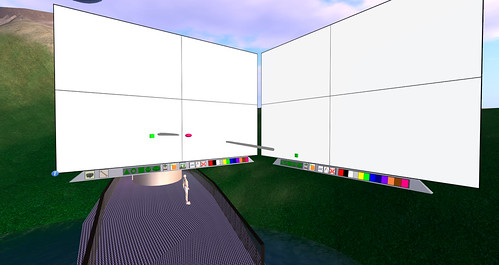
One fantastic tool that helps eLearning providers work together is the BrainBoard. In Second Life, collaboration is typically defined as text chatting and instant messaging. Neither of which are improvements on what we have been doing for years.
Jeff Lowe‘s BrainBoard is a whiteboard on steroids in the virtual world.
The ability to brainstorm with an interactive whiteboard that also emails your sessions for later use is a step forward. A big step. Add to that the ability to create a supplementary board for a facilitator to take notes on and you have a true collaborative tool. eLearning developers now have a tool to truly work together and create the best practices that we thought would develop three years ago.
Soon, we (iliveisl‘s Ener Hax and me) will launch a space in Reaction Grid that any eLearning developer can come into, use the BrainBoard, and chart the future path of virtual world “best practices” in eLearning.
The BrainBoard is also useful for other development work such as sketching out workflows and physical systems. I look forward to developing our “green” initiatives with it as well.
The creator of the BrainBoard, Jeff Lowe, is passionate about helping people grow and this is clear not only with the way BrainBoard is made, but in his time to help ensure you are comfortable using it. It is so well made that I am confident anyone could learn to use it in minutes but Jeff offers his time to step you through its features.
People like Jeff (his Twitter) are the biggest benefit of choosing Reaction Grid and allows me to revisit the excitement I had three years ago. Everyone I have met in Reaction Grid really cares about teaching and sharing.
this post also appears on the iliveisl blog
Free Online Screen Capture
Have you heard of screenr? Do you ever need to record a video of an application or your desktop quickly with minimal hassle?
Do you ever have something you would like to just record and share? Maybe just a quick “how to” or grab some video footage for use in your eLearning?
Screenr.com is an online screen capture tool that is free to use and all you need is a Twitter account. Good in-world (and real life conference) friend David Anderson turned me on to screenr a few months back. Now I have finally had time to try it out and love it!
You can even save your file as an MP4 and import them into flash!
There are very few limitations, especially considering it is free.
There is a 5 minute maximum record time and it looks like it records at 15 frames per second (I do 30 frames per second with Fraps). But these limitations are okay depending on your final use. All you need is a Twitter account and away you go!
This footage will be used in a video to demonstrate a fast way to hide all prims and hide water for building in-world. The jerkiness is from me and not Screenr or Reaction Grid.
