

Why Reaction Grid is much less expensive than Second Life
The Reaction Grid team is very small but amazingly passionate and talented. The cost for Reaction Grid is about 7% that of Second Life. I can attest to that first hand. I have 12 sims in Second Life and have been in Second Life for three years.
In Reaction Grid, I have 4 sims and since it is my grid, I can do far more than I can in Second Life. Last month people would state to me “but it’s not Second Life” and I would be somewhat defensive and list that it did have pluses that Second Life did not. Like 45,000 prims to a sim and the ability to make up to 256 metre prims.
Now, after a month in Reaction Grid, I answer the statement “but it’s not Second Life” with a thank God and Yes! There are so many good things about Reaction Grid. It is what Second Life promised to be years ago. But Linden Lab has grown, Philip is off on a new venture, and it has simply changed. It’s too bad. I was a huge evangelist for them. Spending my own money to speak at conferences, creating video tutorials showcasing Second Life, but no more.
The team at Reaction Grid are wonderful and passionate. And caring.
Here is one reason reaction Grid costs less – it is simply architected better. Read what Microsoft has to say about them here.
Simple Sit Script: deconstructed
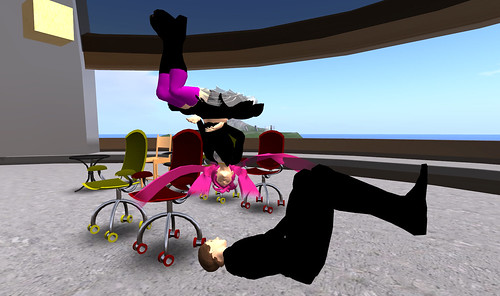
Ikea-wannabe chair designer Ener Hax was hoping to get Dream Walker to script some chairs but timing is everything (read: I should have gone to bed and not logged into the Level 2 Venue grid). =p
Sit scripts are basic scripts to use, but can be a pain to set up when placing in prims that have been cut, hollowed, rotated, spindled, or mutilated (showing my age and the old, old days of computer punch cards! and what is spindling anyway?)
Ener has been making a great collection of chairs for our new endeavor on our very own OpenSim grid hosted by Reaction Grid.
The goal is to create all the furniture needed for making “filming sets” for use in creating video for eLearning scenarios and video podcasts, and also furniture for use in corporate meetings and hotel events. Including details that help raise environmental awareness for meetings in the real world are part of everything we are building (Ener points out the “we” part of this sentence). =D
Apart from my love of eLearning, I taught college Environmental Science for 7 years and we have Matt Courtland from The Natural Strategy consulting with us for “best green practices” in meetings and events (see one of his blog posts on the greening of hotels).
Now for the LSL sit script, hopefully it helps, especially with rotation.
//place this sit script in a prim (poseball) or the root prim of a linked set
//adapted by David Miller - 23 November 2009
//
string text = "sit";
//what you would like the float text to say
//
default
{
    state_entry()
    {
       vector rot=<270, 0, 0>*DEG_TO_RAD;
       //rotation in degrees of avatar on Sit
       //negative values may also be used
       rotation finalRotation=llEuler2Rot(rot);
       //convert rotation
       llSitTarget(<0.2,0.55,-0.3>, finalRotation);
       //x, y, and z position of avatar on Sit
       //negative values may also be used
       //do not use <0,0,0>
       llSetSitText(text);
       llSetText(text,<1.0,1.0,1.0>,0.6);
       //first 3 values are colour of text
       //single value is text alpha - 1 is opaque, 0 is transparent
    }
    changed(integer change)
    {
       if (change & CHANGED_LINK)
       {
          if (llAvatarOnSitTarget() != NULL_KEY)
          {
             llSetText("",<1.0,1.0,1.0>,0.0);
             //hide string text on Sit
             //llSetAlpha(0, ALL_SIDES);
             //if this was a poseball, uncommenting the line above would
             //hide it on Sit
             //to uncomment a line, remove the double forward slashes //
          }
          else
          {
             llSetText(text,<1.0,1.0,1.0>,0.6);
             //restore string text on Stand Up
             //llSetAlpha(1.0, ALL_SIDES);
             //if this was a poseball, uncommenting the line above would
             //show it on Stand Up
             //to uncomment a line, remove the double forward slashes //
          }
       }
    }
}
reposted from the iliveisl blog